Cheat Sheet - Git Commands
| 3 min read
My Cheat Sheet for: Git Commands.
Gathering quick references I used to search over and over again. Good to have them handy and supposed to (slowly) grow.
git log
Git log with some styling (colors and specific order I like to see)
$ git log --pretty=format:"%C(Green)%h %C(Red)[.%D.] %C(Blue)[%an] %C(Yellow)[%s] %C(Magenta)[%ad (%ar)]"
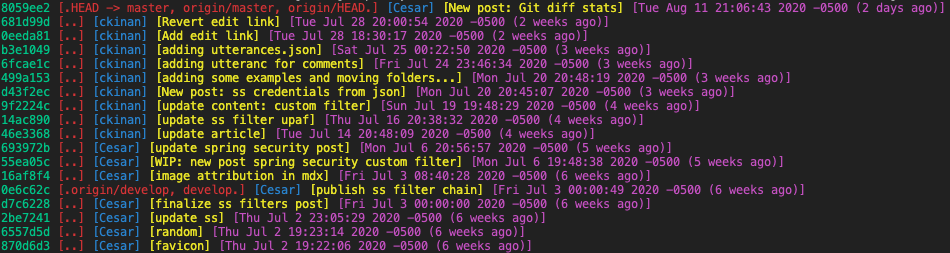
Git log, raw info, tabular style
$ git log --pretty=format:"%h | %ad | %><(23,trunc)%ar | %><(15,trunc)%an | %<(72,trunc)%s | %D" --date=format:"%a %Y-%m-%d %H:%M:%S"

git diff
Get number of files changed, lines inserted and lines removed between two branches or commits
$ git diff --shortstat master..develop
 13 files changed, 90 insertions(+), 410 deletions(-)

$ git diff --shortstat 499a153..8059ee2
 3 files changed, 69 insertions(+), 1 deletion(-)
Get diff between two branches or commits with only relevant information (not the whole diff)
# File names only
$ git diff --name-only origin/main..develop
blog/intro/index.mdx
generator/MarkdownRenderer.py
resources/404.html
resources/about.html
resources/index.html
resources/layout.html
resources/notes.html
resources/post.html
resources/styles.css

# File names with status (modified, deleted, added)
$ git diff --name-status origin/main..develop
M       blog/intro/index.mdx
M       generator/MarkdownRenderer.py
M       resources/404.html
M       resources/about.html
M       resources/index.html
M       resources/layout.html
M       resources/notes.html
M       resources/post.html
M       resources/styles.css

# With stats
$ git diff --stat origin/main..develop
 blog/intro/index.mdx          | 19 +++++++++----------
 generator/MarkdownRenderer.py |  9 +++------
 resources/404.html            |  2 +-
 resources/about.html          |  2 +-
 resources/index.html          |  2 +-
 resources/layout.html         | 12 +++++-------
 resources/notes.html          |  2 +-
 resources/post.html           |  3 +--
 resources/styles.css          | 36 ++++++++++--------------------------
 9 files changed, 32 insertions(+), 55 deletions(-)
git stash
Stash your changes quickly
$ git stash
Stash your changes with a custom message:
$ git stash push -m "your message here"
See your stash entries
$ git stash list
stash@{0}: On main: your message here
See the diff of a given stash entry
$ git stash show -p stash@{0}
diff --git a/blog/cheat-sheet-git-commands/index.mdx b/blog/cheat-sheet-git-commands/index.mdx
index 0a038ac..6134c05 100644
--- a/blog/cheat-sheet-git-commands/index.mdx
+++ b/blog/cheat-sheet-git-commands/index.mdx
@@ -6,12 +6,16 @@ slug: cheat-sheet-git-commands
:
(more)
Save stash diff on disk
$ git stash show -p stash@{0} > ~/your_diff.patch
Apply stash to your current branch. Note: The stash will be removed from the stash store
$ git stash pop stash@{0}
Clean your stash entries
# Only one entry
$ git stash drop stash@{2}
# Delete all your stash entries
$ git stash clear
git reset
Unstage changes made on certain files. (Changes can be staged again with git add command)
git reset file1.py file2.py
GitWeb
To launch git web view
git instaweb --httpd=webrick
And stop with
git instaweb --httpd=webrick --stop
In browser: http://localhost:1234
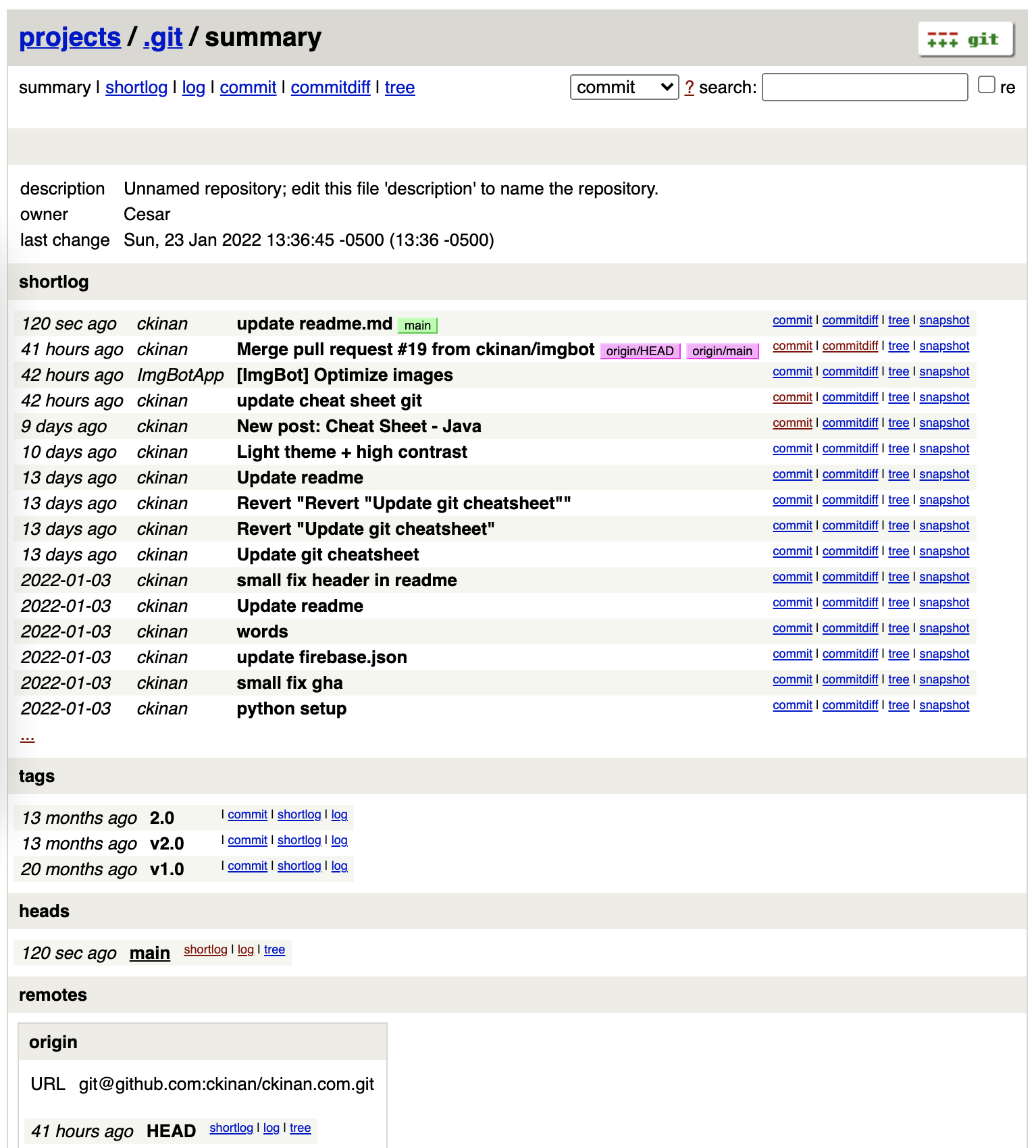
Ref: https://git-scm.com/book/en/v2/Git-on-the-Server-GitWeb
Misc
Stage all changed files even the ones living in parent directories of a git repo
git add -A
# or...
git add --all
Links
- https://stackoverflow.com/a/34957424/7054799 :
- Q: Git asks for username every time I push
- A: Use SSH keys
- https://docs.github.com/en/get-started/getting-started-with-git/setting-your-username-in-git
- Q: How to set my github username
- A: E.g.
git config user.name "ckinan" - A: Similar but for email:
git config user.email "...@...com"
See other cheatsheets here